

What Is Restaurant Management Software?
📊 A restaurant management software is a suite of digital tools designed to streamline and automate a restaurant's complex daily operations.
💡More than just a single program, it acts as a central command centre, supporting everything from booking and table management to staff scheduling, stock control, and payment processing.
🚀 By integrating these critical functions, this type of restaurant software helps owners reduce costs, improve efficiency, and make smarter, data-driven decisions, ultimately freeing up more time to focus on the guest experience.
Key Features of Restaurant Management Software
1. Booking & Table Management
In a digital-first world, seamless online reservation management is essential. This feature allows you to take bookings 24/7, manage your floor plan in real-time, control the pace of service, and reduce costly no-shows through deposits and reminders.
2. POS & Payments Integration
A core feature is the ability to link your front-of-house operations with your finances. POS (Point of Sale) integration connects orders, payments, and booking data, providing a unified view of your sales performance and guest spending habits.
3. Staff Scheduling & Shift Management
Labour is one of your highest costs. This feature helps you create efficient staff rotas based on booking forecasts, manage shift swaps, and track hours, ensuring you are never overstaffed during quiet periods or understaffed during a rush.
4. Inventory & Supplier Management
This feature provides real-time tracking of your stock levels, from individual ingredients to beverage supplies. It helps you control food costs, reduce waste, automate supplier orders, and ensure you never run out of a bestselling dish.
5. Reporting & Analytics
The most powerful software transforms raw data into actionable insights. This feature provides dashboards and reports on key KPIs, such as sales trends, staff performance, and customer behaviour, helping you make informed decisions to improve profitability.
3 Main Benefits of Using a Restaurant Management Software
🎯 More Cost Control
By automating tasks and providing clear data, management software gives you a firm grip on your expenses. It helps you minimise food waste through precise inventory tracking, reduce labour costs with smarter scheduling, and make purchasing decisions that protect your profit margin.
🎯Better Customer Experience
An efficient restaurant is a better restaurant for your guests. Faster, more accurate order taking, seamless booking processes, and personalised service driven by guest data all contribute to a superior dining experience that encourages positive reviews and repeat visits.
🎯 Improved Team Efficiency
When your systems work together, your team can too. Management software reduces manual administrative tasks, improves communication between the kitchen and front-of-house, and provides staff with the information they need to do their jobs effectively, boosting morale and productivity.
The 12 Best Restaurant Management Software in 2025-2026 (UK Edition)

#1 – The Fork Manager

TheFork Manager is a comprehensive, all-in-one platform designed specifically for restaurants seeking both operational excellence and business growth.
It uniquely combines a powerful suite of management tools with access to TheFork, one of Europe's largest diner marketplaces.
This dual focus means it not only streamlines your internal processes like reservations, table management, and guest communication, but also actively works to attract new guests and fill your tables, providing a complete solution for the modern UK restaurant.
- Key Features:
- Advanced reservation and table management with a digital floor plan.
- Access to millions of diners via TheFork marketplace.
- Powerful no-show reduction tools (deposits, card capture, reminders).
- Integrated guest CRM and feedback management.
- Promotional tools to boost bookings during off-peak hours.
- Detailed performance analytics and reporting.
- Integration with Google Reserve and major POS systems.
- Ideal For:
- Restaurants of all sizes, from independents to multi-site groups, that are focused on growth.
- Venues looking for a single solution to manage both operations and marketing.
|
Cons |
Pros |
|---|---|
|
Requires active engagement with marketing tools to unlock full value. |
The unique combination of management software and a diner marketplace. |
|
The feature set may be more extensive than what a very small venue requires. |
A powerful and dedicated focus on the restaurant industry's specific needs. |
|
Subscription model may be a different approach for those used to one-off software costs. |
Excellent, multi-layered tools to significantly reduce costly no-shows. |
- Pricing: Flexible, tiered subscription plans designed to suit different restaurant needs and budgets.
#2 – Lightspeed Restaurant POS

Lightspeed is a cloud-based POS system that provides a robust platform for managing sales, orders, and payments.
It's a powerful tool for centralising front-of-house and kitchen operations, with a strong focus on providing detailed sales analytics and multi-location management capabilities. While it excels as a POS, its core function is transaction management rather than dedicated reservation or marketing management.
- Key Features:
- Intuitive iPad-based POS interface.
- Advanced sales reporting and analytics.
- Multi-location management from a single account.
- Integrated payments processing.
- Customer relationship management (CRM) features.
- Built-in inventory management.
- Ideal For:
- Restaurants and pubs needing a powerful, scalable POS system.
- Multi-site groups that want to standardise their sales and reporting processes.
|
Cons |
Pros |
|---|---|
|
Does not have its own built-in diner marketplace to help attract new guests. |
A powerful and highly-rated all-in-one POS platform. |
|
Advanced reservation features often require integration with a third-party partner. |
Excellent for managing complex menus and multi-location operations. |
|
The focus is primarily on on-site operations, not external marketing. |
Strong analytics and reporting capabilities. |
- Pricing:
#3 – Square for Restaurants

Square is a popular and accessible ecosystem of tools for small to medium-sized businesses in the UK.
Square for Restaurants bundles its well-known payment processing with a user-friendly POS, online ordering, and basic reservation features. It's designed to be an affordable, all-in-one solution for cafes, QSRs, and independent restaurants that need a simple yet effective system.
- Key Features:
- All-in-one POS, payments, and management system.
- Integrated online ordering and delivery management.
- Basic reservation and table management features.
- Simple staff management and payroll tools.
- Customer directory for basic CRM.
- Ideal For:
- Small to medium-sized restaurants, cafes, and pubs.
- New businesses looking for an affordable, easy-to-use startup solution.
|
Cons |
Pros |
|---|---|
|
Reservation and table management features are less advanced than specialised systems. |
An incredibly accessible and user-friendly all-in-one platform. |
|
Lacks a dedicated marketplace to drive new customer acquisition. |
Transparent and competitive pricing model. |
|
The CRM and marketing tools are more basic than dedicated platforms. |
Seamless integration with Square's wider ecosystem of business tools. |
- Pricing: Offers a free plan with basic features, with paid plans available for more advanced capabilities.
#4 – Toast POS UK

Toast is a restaurant management platform that has gained significant traction in the US and is now available in the UK. It combines POS, payment processing, and back-office management on industry-grade hardware.
Toast is designed to be an end-to-end solution, covering everything from online ordering to staff payroll and inventory.
- Key Features:
- Integrated POS, payments, and back-office platform.
- Online ordering and delivery modules.
- Guest engagement tools, including email marketing and loyalty programs.
- Inventory and supplier management.
- Team management and payroll features.
- Ideal For:
- Restaurants of all sizes looking for a single, unified technology partner.
- Venues that want a robust, all-in-one hardware and software solution.
|
Cons |
Pros |
|---|---|
|
Can be a more significant upfront investment due to its reliance on proprietary hardware. |
A fully integrated, end-to-end platform for all restaurant operations. |
|
Its diner-facing marketplace for discovery is not as established in the UK as other platforms. |
Strong features for online ordering, loyalty, and email marketing. |
|
Less flexibility to integrate with third-party reservation systems. |
Excellent reporting and analytics capabilities. |
- Pricing: Custom pricing based on hardware and software needs.
#5 – EPOS Now

EPOS Now is a UK-based company providing a cloud-based POS system for the retail and hospitality sectors.
Its restaurant software is designed to be flexible, allowing users to manage orders, payments, and basic inventory from any device. It's known for its extensive app store, which allows restaurants to add specific functionalities as they need them.
Key Features:
-
- Cloud-based POS accessible on multiple devices.
- Table management and floor plan customisation.
- Online ordering and delivery integrations.
- Customer management and basic loyalty features.
- Extensive app store for third-party integrations (e.g., accounting, reservations).
- Ideal For:
- Independent restaurants and pubs in the UK.
- Businesses that want the flexibility to build a customised tech stack via an app store.
|
Cons |
Pros |
|---|---|
|
Core reservation tools are basic, often requiring a paid app integration for advanced features. |
A flexible and customisable system with a large app marketplace. |
|
Does not provide its own marketing platform to help attract new diners. |
Strong UK-based customer support. |
|
Some users report that the interface can be less intuitive than competitors. |
Good for both hospitality and retail operations. |
- Pricing: Pricing is based on a combination of software subscription and hardware costs.
#6 – TouchBistro

TouchBistro is an iPad-based POS system designed specifically for the restaurant industry.
It offers a comprehensive suite of features that cover not just sales, but also table management, staff scheduling, and menu control. It is designed to be an all-in-one operational tool for the front and back of house.
- Key Features:
- iPad POS with tableside ordering capabilities.
- Visual floor plan and table management.
- Menu and inventory management.
- Staff management and reporting.
- Add-on modules for reservations, loyalty, and online ordering.
- Ideal For:
- Full-service restaurants, pubs, and cafes.
- Venues that want the flexibility of a mobile, iPad-based system.
|
Cons |
Pros |
|---|---|
|
Advanced reservation management is an add-on module, not a core feature. |
An intuitive and user-friendly iPad interface. |
|
Its focus is on optimising on-site operations, not on driving external guest discovery. |
Strong feature set designed specifically for restaurant workflows. |
|
The need for multiple add-ons can increase the total cost and complexity. |
Excellent for tableside ordering and improving service speed. |
- Pricing: Subscription-based model.
#7 – MarketMan

MarketMan is not a POS or reservation system, but a specialised back-office platform focused entirely on inventory and supplier management.
It helps restaurants streamline their purchasing, control food costs, and manage stock with precision. It is designed to integrate with POS systems to provide a complete picture of profitability.
- Key Features:
- Real-time inventory tracking.
- Supplier ordering and invoice management.
- Recipe costing and menu profitability analysis.
- Waste and theft tracking.
- Integration with major POS and accounting software.
- Ideal For:
- Restaurants and groups focused on tight cost control.
- Businesses with complex inventory and multiple suppliers.
|
Cons |
Pros |
|---|---|
|
It is a niche tool and does not manage any front-of-house operations like bookings or service. |
An incredibly powerful tool for controlling food costs and optimising inventory. |
|
Requires integration with a separate POS system to be fully effective. |
Excellent for recipe costing and understanding menu profitability. |
|
The focus is purely on back-office efficiency, not the guest experience. |
Streamlines the entire purchasing and supplier management process. |
- Pricing: Subscription-based, with different tiers based on features and number of locations.
#8 – 7shifts

7shifts is a software platform dedicated to solving one of the biggest challenges in hospitality: staff scheduling and team management.
It's designed to help restaurant managers build more efficient rotas, improve team communication, and reduce labour costs. It is not an all-in-one system, but a best-in-class tool for workforce management.
- Key Features:
- Drag-and-drop schedule builder.
- Mobile apps for staff to view schedules and swap shifts.
- Time clocking and attendance tracking.
- Team communication and announcement features.
- Integration with POS systems to forecast labour based on sales data.
- Ideal For:
- Restaurants of all sizes looking to improve their staff scheduling process.
- Businesses focused on reducing labour costs and improving team communication.
|
Cons |
Pros |
|---|---|
|
This is a specialised tool for staff, it does not manage customers, bookings, or inventory. |
A good solution for restaurant staff scheduling and management. |
|
It is an additional subscription on top of your POS and reservation system. |
Significantly reduces the time managers spend building rotas. |
|
Does not provide a unified view of all restaurant operations. |
Excellent mobile app for staff improves team communication and engagement. |
- Pricing: Offers a free plan for single locations, with paid plans available for more features.
#9 – Deputy

Similar to 7shifts, Deputy is a powerful workforce management and scheduling software used across many industries, including hospitality.
It helps businesses manage everything from rotas and timesheets to team communication. It's a comprehensive tool for ensuring you have the right people in the right place at the right time.
- Key Features:
- AI-powered auto-scheduling based on demand signals.
- Mobile apps for staff communication and shift management.
- Time tracking and payroll integration.
- Compliance features for UK labour laws.
- Task management tools.
- Ideal For:
- Restaurants and hospitality groups with complex staffing needs.
- Businesses wanting to automate the scheduling process as much as possible.
|
Cons |
Pros |
|---|---|
|
As a general workforce tool, it lacks some restaurant-specific nuances of its competitors. |
Powerful automation and AI features for efficient scheduling. |
|
It is another separate system to manage alongside your core restaurant software. |
Strong compliance tools for UK employment regulations. |
|
The focus is entirely on managing your team, not your guests or sales. |
Excellent for managing time, attendance, and integrating with payroll. |
- Pricing: Subscription-based, charged per user per month.
#10 – FoodHub Restaurant Software

FoodHub is a UK-based platform focused primarily on providing online ordering systems for takeaways and restaurants.
It offers a commission-free model, positioning itself as an alternative to the major delivery aggregators. Its software helps restaurants manage their own online orders, whether for collection or local delivery.
- Key Features:
- Commission-free online ordering portal.
- Website and mobile app for your restaurant.
- Integrated POS and order management terminal.
- Driver tracking and delivery management.
- Ideal For:
- Takeaways and restaurants with a strong focus on delivery and collection.
- Businesses looking to move away from commission-based delivery apps.
|
Cons |
Pros |
|---|---|
|
Core focus is on takeaway orders, not dine-in reservation or table management. |
Commission-free model can increase profitability on online orders. |
|
Lacks a large, built-in marketplace of diners actively searching for dine-in experiences. |
A complete, turnkey solution for managing your own delivery and collection service. |
|
Less suitable for restaurants where the primary business is dine-in service. |
Strong focus on the UK market. |
- Pricing: Typically involves a fixed weekly or monthly rental fee.
#11 – Revel Systems

Revel Systems (now part of Shift4) is an iPad-based cloud POS platform that serves a wide range of businesses, with a strong offering for the restaurant industry.
It's a highly scalable and customisable system designed for high-volume and multi-location operations, providing deep reporting and management capabilities.
- Key Features:
- Scalable iPad POS platform.
- Advanced inventory and ingredient-level tracking.
- Customer relationship management (CRM) features.
- Multi-location management and reporting.
- Open API for custom integrations.
- Ideal For:
- Large restaurant chains and franchise groups.
- High-volume quick-service restaurants.
|
Cons |
Pros |
|---|---|
|
Can be complex and expensive for small, independent restaurants. |
A highly scalable and powerful enterprise-level POS. |
|
The focus is on internal operations and sales, not on attracting new diners from a marketplace. |
Excellent for managing complex, multi-location businesses. |
|
The extensive feature set can have a steep learning curve. |
Strong inventory and back-office management features. |
- Pricing: Custom pricing based on a software subscription, hardware, and installation.
#12 – Restaurant365

Restaurant365 is a cloud-based back-office platform designed for restaurants.
It connects your POS data with your accounting, inventory, and staff scheduling. It is not a POS itself, but a powerful engine that sits behind it to give operators a complete financial and operational overview of their business.
- Key Features:
- Restaurant-specific accounting platform.
- Integrated inventory, payroll, and scheduling.
- Connects with hundreds of different POS systems.
- Advanced reporting and financial dashboards.
- Ideal For:
- Multi-location restaurant groups.
- Finance and operations teams that need a single source of truth.
|
Cons |
Pros |
|---|---|
|
This is a complex back-office tool and does not handle any guest-facing functions like reservations. |
Provides a unified view of a restaurant's financial and operational health. |
|
It is an enterprise-level solution that is not suitable for small independents. |
Integration capabilities with a wide range of POS systems. |
|
Requires a significant investment in both time and money to implement properly. |
A best-in-class tool for multi-unit accounting and operations. |
- Pricing: Subscription-based, designed for multi-location groups.
How to Choose the Right Restaurant Management Software
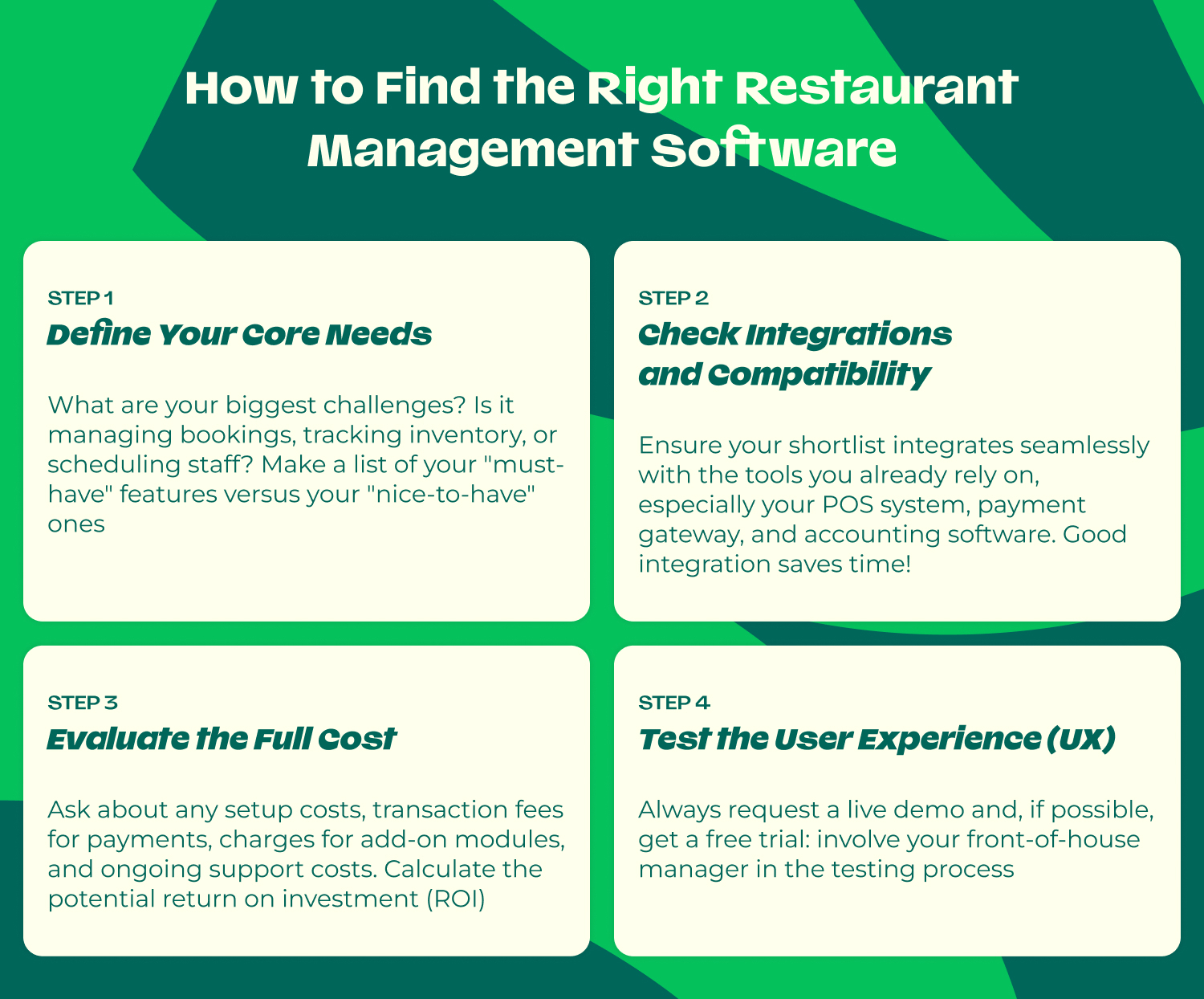
Define Your Core Needs
Start by identifying your biggest pain points. Are you struggling with no-shows and need a better reservation system? Is your inventory out of control? Do you need a more efficient way to schedule staff? Be clear on whether your primary need is reservations, POS, inventory, or workforce management.
Check Integrations & Compatibility
The best software works seamlessly with the tools you already use. Ensure your chosen platform integrates with your existing POS system, payment gateway, and any delivery apps you use. A lack of integration can create data silos and manual work for your team.
Evaluate Pricing Models
Understand the total cost. Is it a flat monthly subscription, a per-terminal fee, or a per-location cost? Ask about any setup fees, hardware costs, and charges for ongoing support. Choose a model that aligns with your business's budget and growth projections.
Test the User Experience
The most powerful software is useless if your team struggles to use it. Always request a demo and, if possible, a free trial. Test the interface and workflow to ensure it is intuitive and well-suited to the fast-paced environment of your restaurant.
Comparison Table: Overview of the Best Restaurant Management Software 2025-2026
|
Name Software |
Best For |
Key Features |
Price |
Link to Software Website |
|---|---|---|---|---|
|
TheFork Manager |
Growth-focused restaurants |
Reservations, Marketplace, CRM |
Tiered Subscription |
|
|
Lightspeed POS |
Multi-location groups |
POS, Analytics, Inventory |
Subscription |
|
|
Square for Restaurants |
Small/Medium independents |
POS, Payments, Ordering |
Free & Paid Plans |
|
|
Toast POS UK |
All-in-one POS solution seekers |
POS, Hardware, Back-office |
Custom Quote |
|
|
EPOS Now |
UK independents |
POS, App Store, Flexibility |
Subscription |
|
|
TouchBistro |
Full-service restaurants |
iPad POS, Tableside Ordering |
Subscription |
|
|
MarketMan |
Cost-control focused venues |
Inventory, Supplier Mgt |
Subscription |
|
|
7shifts |
All restaurants |
Staff Scheduling, Comms |
Free & Paid Plans |
|
|
Deputy |
Complex staffing needs |
AI Scheduling, Workforce Mgt |
Per User/Month |
|
|
FoodHub |
Takeaway-focused venues |
Online Ordering, Delivery |
Fixed Fee |
|
|
Revel Systems (part of Shift4) |
Large chains/franchises |
Enterprise POS, Scalability |
Custom Quote |
|
|
Restaurant365 |
Multi-unit groups |
Accounting, Back-office |
Subscription |
Why Restaurants Choose The Fork Manager
While many tools on this list excel at one specific function - like POS or staff scheduling - TheFork Manager is uniquely positioned as a comprehensive platform designed to both streamline operations and actively drive growth.
Its core difference lies in its powerful combination of sophisticated management software and access to one of Europe's largest diner marketplaces.
This means it doesn't just help you manage the guests you already have; it actively helps you attract new ones. With a deep focus on reservations, smart table management, powerful marketing tools, and industry-leading analytics, it provides a complete ecosystem for the modern UK restaurant looking to thrive.
FAQ About Restaurant Management Software
What Is Restaurant Management Software?
It is a digital platform that helps restaurants automate and streamline their core operations, including reservations, POS, inventory, staff scheduling, and analytics, all from a central hub.
What Does Restaurant Software Typically Include?
Core features usually include a reservation or booking system, table management, a point-of-sale (POS) for processing orders and payments, inventory tracking, and staff management tools.
What Is the Best Restaurant Management Software in the UK?
The best software depends on your needs. TheFork Manager is an excellent all-in-one choice for growth, Lightspeed is a top-tier POS, and 7shifts is best-in-class for staff scheduling.
How Much Does Restaurant Management Software Cost?
Costs vary widely, from free basic plans to several hundred pounds per month for advanced, all-in-one platforms. Pricing models can be a flat monthly subscription, a per-location fee, or based on the number of terminals.
Do Small Restaurants Need Management Software?
Yes, absolutely. Modern, affordable cloud-based software can save small restaurant owners a huge amount of time on administrative tasks, reduce costly errors, and provide valuable insights to help them compete effectively.
What Software Do Most Restaurants Use for Reservations?
Many restaurants use integrated reservation systems like TheFork Manager, which combines a management tool with a large diner marketplace to both manage and attract bookings.
What Is the Difference Between POS Software and Restaurant Management Software?
POS software is primarily focused on processing sales and payments. A comprehensive restaurant management software is a broader platform that often includes a POS but also integrates other key operations like reservations, inventory, and staff scheduling.
Can Restaurant Software Help Reduce Costs?
Yes, significantly. It helps reduce costs by minimising food waste through inventory tracking, optimising labour expenses with smart scheduling, and reducing lost revenue from no-shows.
Which Software Is Best for Multi-Location Restaurants?
For multi-location restaurants, platforms like Lightspeed, Revel Systems, and Restaurant365 are excellent as they are designed for centralised management, reporting, and scalability across multiple sites.
Is Restaurant Management Software Easy to Use?
Modern cloud-based software is designed to be highly intuitive and user-friendly, with clean interfaces and mobile apps. However, it's always recommended to request a demo to ensure it's a good fit for your team.
Empty tables and ever-increasing costs?